Installation
Crow-Eye is designed to be as portable and low-impact as possible. You can run it directly from source or use the executable.
Video Demonstration
Correlation Engine
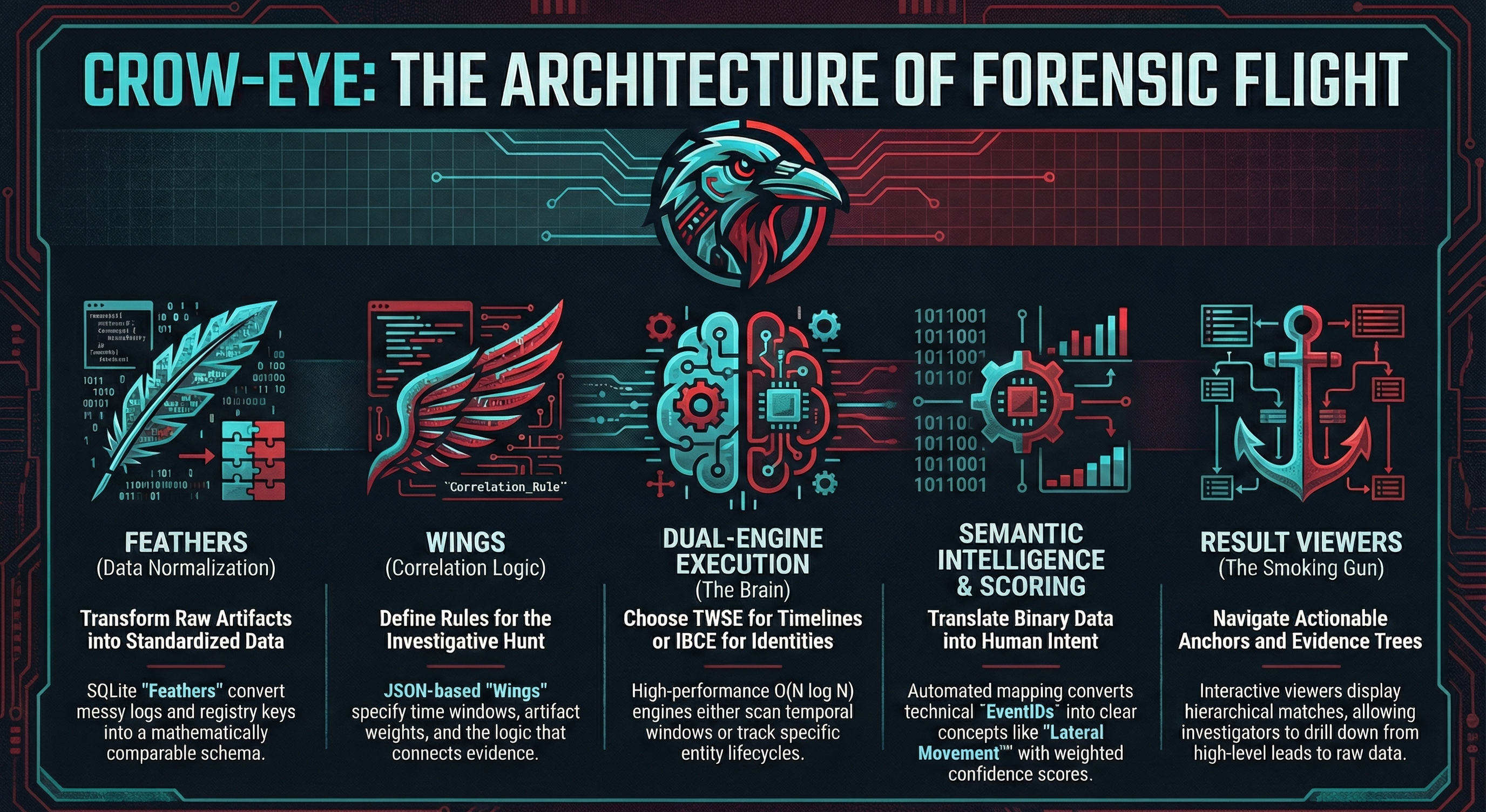
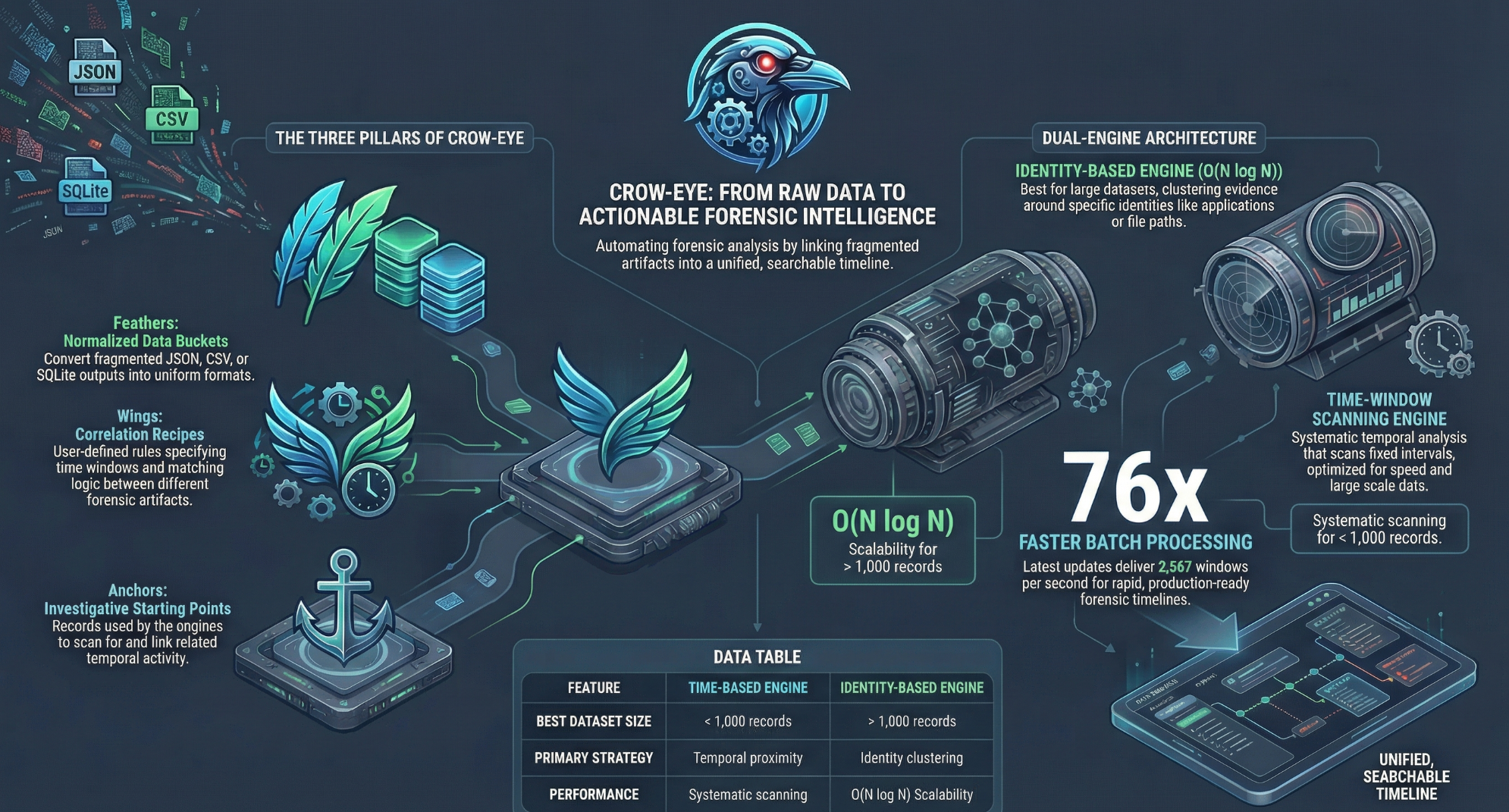
The Correlation Engine is the core intelligence of Crow-Eye. It transforms isolated forensic artifacts into a unified investigative narrative.
1. Core Architecture & Terminology
Before configuring your first pipeline, it is essential to understand the two foundational pillars of the Crow-Eye architecture:
Feathers (Data Layer)
High-performance, normalized input data. Crow-Eye is tool-agnostic; while it has internal parsers, Feathers can be created from any external tool output (CSV, JSON, SQLite), such as Eric Zimmerman’s suite (PECmd, AmcacheParser, EvtxECmd).
Wings (Logic Layer)
The forensic rulesets. Wings define how Feathers interact. They dictate correlation boundaries, time windows, evidence scoring, and semantic tagging.
2. The Pipeline Manager
The Pipeline Manager is your initial configuration workspace, divided into case metadata and the data/logic builders.
A. Case Metadata
When running the engine for the first time, it generates a default pipeline based on your initial case identifier. You can update the Case ID, Pipeline Name, and Investigator Name to maintain strict evidentiary organization.
B. Feather Creator (Data Ingestion)
The Feather Creator maps raw artifact outputs into the engine's high-speed query format. If you used Crow-Eye’s internal parsers previously, this step is automated.
- Define Save Location: By default, Crow-Eye routes these to your specific case folders (
correlation_configorcorrelation_feathers). - Select Source: Browse for your CSV, JSON, or SQLite file.
- Note for SQLite: The engine auto-detects artifact types based on file metadata. For multi-table databases, use the dropdown to target specific tables.
- Note for CSV: Ensure you specify the correct delimiter (comma, tab, or semicolon).
- Column Mapping: Use the interactive grid to streamline your data. Select only forensically relevant columns and rename them to match standardized timeline conventions.
- Data Preview & Build: Inspect the row input preview. Once verified, click Import to Feather.
C. Wing Creator (Forensic Rulesets)
Wings dictate the investigative hypothesis. Creating a new Wing involves three primary configuration areas:
| Tab | Description & Best Practices |
|---|---|
| Basic Config | Define correlation settings (target specific apps), set the Time Window for event clustering, and set Anchor Priority for your "source of truth." |
| Scoring | Apply weighted scoring to evidence. Assign weights to individual Feathers based on reliability. Wing-specific scoring overrides global system defaults. |
| Semantic Mapping | Simple Mode: Direct 1-to-1 mapping (e.g., EventID 4624 → Successful Login). Advanced Mode: Construct complex conditional logic using AND / OR operators across multiple Feathers (e.g., Process Name + Destination IP) to apply granular semantic tags. |
3. Execution Engine
The Execution Engine is where your configuration is deployed against the data.
4. The Result Viewer
Interpret your findings through three comprehensive views:
Summary Tab
Statistical overview including total matches, wings deployed, and processing time. Visualizations detail evidence origination (MFT, USN Journal vs. Volatile Logs).
Identity Result Viewer
Hierarchical data display: Identity → Anchor → Evidence. Drill down to raw records and hover over semantic tags for underlying logic tooltips.
Time-Based Result Viewer
Organizes data into chronological blocks (default 3-hour windows). Use the micro-timeline filter to isolate events down to the exact minute of a suspected incident.
Dynamic Linking Engine
In complex digital forensic investigations, analyzing raw artifacts—such as SIDs, MAC addresses, file hashes, and GUIDs—often creates a bottleneck. The Dynamic Linking Engine operates as an automated semantic translator within the Crow-Eye platform. It dynamically enriches your data display by appending human-readable context directly into your analytical tables in real-time.
Strict Forensic Integrity
Your original evidence is sacrosanct. The engine relies on an isolated database (Crow_Intelligence.db). Primary forensic databases (SAM, Prefetch, Amcache, etc.) are never altered or written to.
High-Performance Execution
Enrichment occurs natively at the database level utilizing optimized SQLite ATTACH and LEFT JOIN operations. Even massive datasets load instantly without memory overhead.
Accessing the Interface
- Ensure you have an **active case loaded** within the Crow-Eye platform.
- Navigate to the **Sidebar Menu** on the left-hand side.
- Click the DYNAMIC LINKING module (indicated by the Cyan/Teal icon).
Intelligence Gathering
Extract intelligence from parsed artifacts using built-in or custom rules.
Default Rulesets
- SID → Username: Links user mappings from SAM/Registry.
- MAC → Network Name: Maps routers to SSIDs from WLAN logs.
- ProcessID → Process Name: Resolves raw PIDs to executables.
- EventID → Description: Appends official MS descriptions.
Custom Rule Generation
Define logic for unique artifacts: Select Source DB, Table, Value Column (Raw Data), and Key Column (Human Context).
Bulk IOC Ingestion
Inject external CTI or Indicators of Compromise (IOCs) directly into the matrix.
Execution Steps
- Prepare a
.csvor.jsonfile (Value/Key columns). - Drag & Drop into the ingestion zone.
- Automatic parsing injects data into
Crow_Intelligence.db.
[LockBit_v3].
Live Mapping Dashboard
Master view for real-time management of active mappings.
- Search Engine: Rapidly locate values/keys across the DB.
- Contextual View: Review Raw Value, Key, and Intelligence Source.
- Data Management: Delete erroneous mappings or add manual pairs.
- Reporting: Export entire matrix to CSV for case notes.
Conflict Resolution
If conflicting keys exist for one value, the engine concatenates the context: Raw_Hash [Malware_A, Malware_B].
Deploying the Intelligence
Once verified, click the primary "RUN DYNAMIC LINKING" button. The interface will close, and Crow-Eye will automatically refresh forensic views (LNK, USN, Event Logs), enriching data cells instantly.
Failed to Initialize
Ensure an active case is initialized and the platform has write permissions in the case directory to create Crow_Intelligence.db.
Enrichment Not Displaying
Verify the gathering rule corresponds to the active data view (e.g., SID rules only apply to columns designated as SIDs by the backend).
Eye AI Assistant
Active Development Notice: The Eye Assistant is currently in continuous active development. Expect significant changes and new forensic capabilities in upcoming releases.
The Eye Assistant is your AI-powered forensic co-pilot. It allows you to interact with your case data using natural language, making complex investigations faster and more intuitive.
Conversational Triage
Ask questions like "Show me all execution events between 2 PM and 4 PM" or "Find any suspicious network connections from user Ghassan".
Living Reports
As you investigate, Eye builds a real-time report with data tables, charts, and narrative findings that can be exported for final case documentation.
RAG Analysis
Eye uses Retrieval-Augmented Generation to pull in forensic knowledge about specific artifacts, helping you interpret complex registry keys or event logs.
Getting Started with Eye
- Open the Eye Assistant from the main toolbar.
- Configure your Backend: Choose between Cloud APIs (OpenAI/Anthropic) or Local Models (Ollama/LM Studio) in the settings.
- Initialize Case Context: Provide a brief summary of your investigation goal to help Eye focus its analysis.
- Start Investigating: Type your queries in the chat bar. Eye will automatically execute the necessary SQL and search tools.
The Ghassan Elsman Protocol
Eye operates under a strict forensic protocol. Every AI response is anchored in raw evidence, and all internal actions are recorded in a machine-readable audit trail for non-repudiation and chain of custody preservation.
Forensic Toolset
Eye has direct access to several specialized forensic tools:
Investigative
- SQL Querying: Direct access to all artifact databases.
- Global Search: Regex hunting across the entire case.
- Intel Lookup: Live research via LOLBAS and LOLDrivers.
- Correlation Access: Deep integration with the Wing/Feather engine.
Reporting
- Data Tables: Interactive tables with sorting/filtering.
- Charts: Bar, Line, and Pie visualizations.
- Markdown: Rich-text narrative documentation.
- Export: Formal PDF and HTML investigative reports.
Troubleshooting
Encountering issues? Check these common solutions for the most frequent technical hurdles.
Dependency Failures
If PIP fails, retry the command. Network fluctuations can occasionally interrupt the virtual environment initialization.
Permission Denied
Forensic artifacts (MFT, Registry, Event Logs) require high-level access. Always launch the terminal or EXE as **Administrator**.
Smart App Control
Windows may flag the unsigned binary. Click 'More info' -> 'Run anyway'. For permanent access, disable Smart App Control in Windows Security.
- Open **Windows Security**
- Go to **App & browser control**
- Set **Smart App Control** to Off